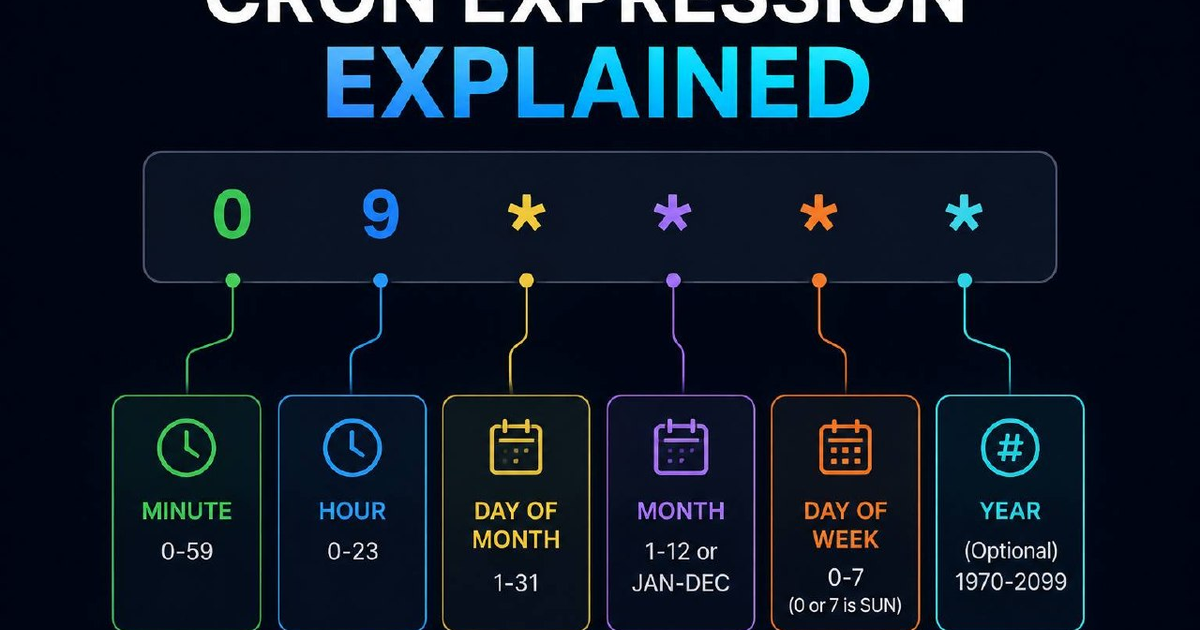

Cron expressions are the heartbeat of server automation, they handle your backups, your cache clearing, and your scheduled reports. But for many, the five-column syntax looks like an ancient cipher. This guide breaks down exactly how to schedule a task for every five minutes, explains the math behind the 'slash' operator, and provides a cheat sheet you can copy-paste into our Cron Expression Generator.
What is the cron expression to run every 5 minutes?
The cron expression to run a task every 5 minutes is */5 * * * *. In this syntax, the first column (minutes) uses the 'step' operator */5, which means 'every minute that is a multiple of 5.' The remaining four asterisks represent every hour, every day of the month, every month, and every day of the week. This ensures the command executes at 0:00, 0:05, 0:10, and so on, around the clock.
How the 5-minute cron expression works
A standard cron expression has five fields. Here is how */5 * * * * breaks down field by field:
| Field | Value | Meaning |
|---|---|---|
| Minutes | */5 | Every minute divisible by 5 (0, 5, 10...) |
| Hours | * | Every hour |
| Day of Month | * | Every day |
| Month | * | Every month |
| Day of Week | * | Every day of the week |
The */n syntax is called the step operator. It tells the cron daemon to skip through the allowed range (0–59 for minutes) in increments of 5. If you wanted every 15 minutes, you would use */15.
Common cron intervals cheat sheet
Use this table for the most common scheduling needs in 2026. All of these can be tested and modified in our online cron generator.
| Schedule | Cron Expression |
|---|---|
| Every minute | * * * * * |
| Every 5 minutes | */5 * * * * |
| Every 15 minutes | */15 * * * * |
| Every hour (at minute 0) | 0 * * * * |
| Twice a day (12 AM and 12 PM) | 0 0,12 * * * |
| Every night at midnight | 0 0 * * * |
| Every Monday at midnight | 0 0 * * 1 |
| First day of the month | 0 0 1 * * |
Pro tips for cron scheduling
- Check your timezone. Servers typically run on UTC. If you schedule a backup for
0 0 * * *(midnight), it will run at midnight UTC, which might be 4 PM or 8 AM in your local time. - Avoid 'Every Minute' if possible. Unless you are running a high-frequency queue worker, 'every 5 minutes' or 'every 15 minutes' is much kinder to your server's CPU and database load.
- Log your output. Cron runs silently. Always append
>> /path/to/logfile.log 2>&1to your command so you can debug when things don't fire. - Use absolute paths. The cron environment is minimal. Instead of
python script.py, use/usr/bin/python3 /home/user/script.py.
Frequently Asked Questions
Does */5 * * * * mean every 5 minutes starting now?
No. Cron is clock-based, not interval-based. It runs when the clock's minute matches the expression. If you save the cron at 12:03, it won't run at 12:08, it will run at 12:05, because 5 is the next multiple of the clock minute.
What is the difference between */5 and 0,5,10,15...?
Nothing. They are functionally identical. */5 is simply a shorter, cleaner way to write the same thing.
Can I use 'every 5 minutes' only during certain hours?
Yes. For example, */5 9-17 * * * would run every 5 minutes, but only during business hours (9 AM to 5 PM).