How do I decode a JWT safely?
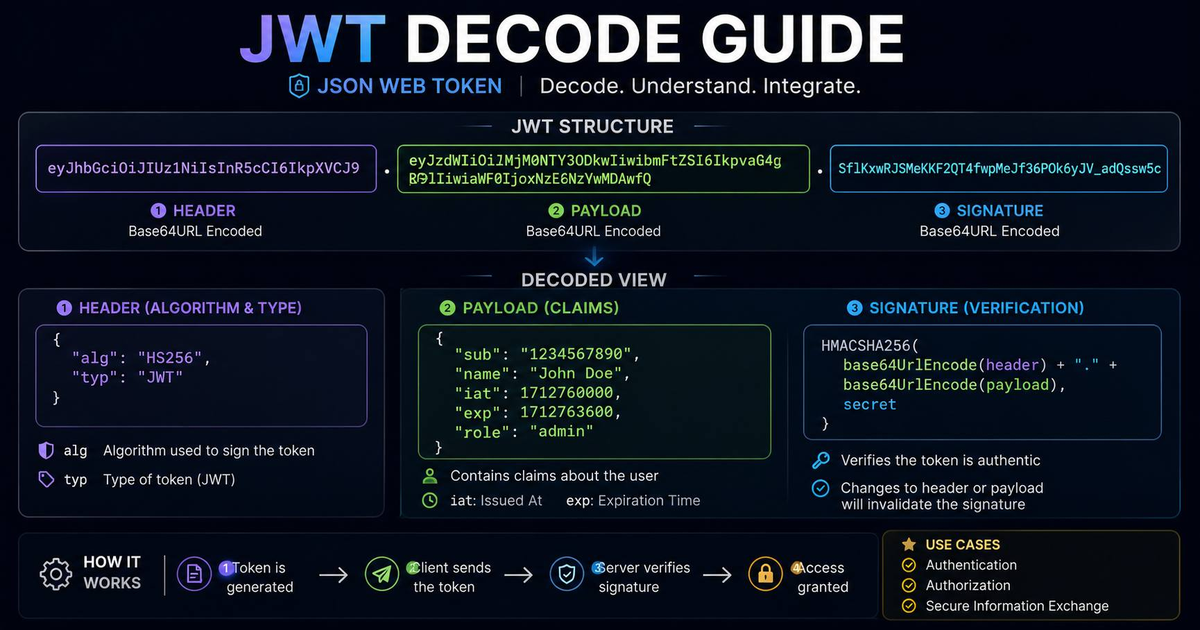
To decode a JWT safely, use a tool that performs the decoding entirely in your browser using JavaScript, rather than sending the token to a server. Our JWT Decoder is 100% client-side. Simply paste your token, and the tool will show you the Header, Payload, and Signature without ever transmitting the data across the network.
The Hidden Risks of Online Decoders
If you use a decoder that sends your token to their server, they could potentially hijack your session. I’ve seen "free" tools that log tokens for "debugging" purposes—this is a massive security risk. I built this tool specifically to provide a zero-trust alternative for developers who value privacy.
What to Look for in Your Payload
When you decode your token, check the exp (expiration) and iat (issued at) claims. I often find tokens that are valid for too long, which is a common security oversight. Use our tool to audit your token policies without leaking them.
Frequently Asked Questions
Does decoding a JWT verify the signature?
Decoding just shows you the data. Verification requires the secret key. Our tool is a decoder, not a validator—we show you what’s inside, but we don’t verify that it hasn’t been tampered with.