
Every backend engineer, data analyst, and growth marketer eventually hits the same fork in the road: do I export this as JSON or CSV? Pick wrong and you spend an afternoon fighting type coercion, quote-escaping bugs, or a 400 MB file your spreadsheet can't open. This guide cuts through the religious debate, lays out the actual trade-offs, and shows you how to convert between the two formats safely with zero-upload, browser-side tools.
When should you use JSON vs CSV?
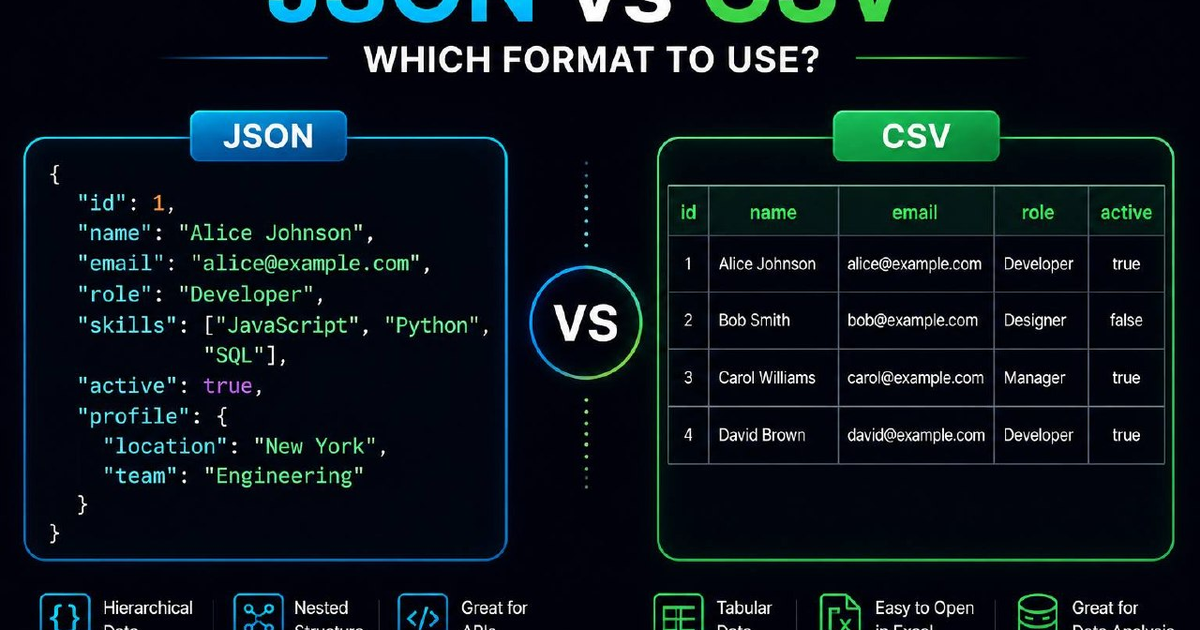
Use CSV for tabular data with a single, fixed schema, rows of records that all share the same columns. Use JSON for nested or hierarchical data, optional fields, mixed types, or any payload an API will read. CSV wins on file size, spreadsheet compatibility, and streaming. JSON wins on expressiveness, type fidelity, and tooling. When you need both, for example, a CSV export of a JSON API. Convert with a browser-based tool like our CSV / JSON converter so nothing leaves your machine.
JSON vs CSV side by side
| Feature | JSON | CSV |
|---|---|---|
| Structure | Hierarchical (nested objects and arrays) | Flat tabular (rows and columns) |
| Data types | String, number, boolean, null, object, array | String only (interpretation is up to the reader) |
| Schema | Per-record, flexible | Fixed across all rows (one header line) |
| File size | Larger (keys repeated each record) | Smaller (keys appear once, in the header) |
| Human readability | Good with indentation | Excellent for small files in a spreadsheet |
| Spreadsheet support | Plugin or conversion required | Native everywhere |
| Streaming / line-by-line parse | Hard (need ND-JSON / JSONL) | Trivial |
| Unicode handling | Built-in (UTF-8) | Encoding ambiguity is common |
| Quote / escape rules | Strict and unambiguous | RFC 4180 plus dozens of dialects |
| Comments | Not supported (use JSON5 or JSONC if needed) | Not supported |
| Typical use case | REST API responses, config files | Spreadsheet exports, log analysis, ML datasets |
Why CSV is so much smaller
Consider 10,000 user records with five fields each. In JSON every record repeats every key:
[
  {"id": 1, "name": "Ada", "email": "ada@example.com", "active": true, "score": 92.4},
  {"id": 2, "name": "Bob", "email": "bob@example.com", "active": false, "score": 71.8},
  ...
]
That repeats "id", "name", "email", "active", "score" ten thousand times. In CSV they appear exactly once, on line one:
id,name,email,active,score
1,Ada,ada@example.com,true,92.4
2,Bob,bob@example.com,false,71.8
...
For uniform tabular data CSV is typically 40-60% smaller. With gzip compression the gap narrows but does not disappear, the repeated keys compress well, but the punctuation overhead (curly braces, quotes around every string, commas after every value) stays.
When CSV clearly wins
- Spreadsheet handoff. Marketing, finance, and operations live in Excel and Google Sheets. CSV opens natively in both.
- Streaming and line-by-line processing. Read a 50 GB CSV one row at a time without ever holding the whole file in memory. JSON arrays require parsing the entire structure unless you use JSONL.
- Tabular machine learning datasets. pandas, scikit-learn, R, and every BI tool consume CSV natively.
- Database bulk imports.
COPY ... FROMin PostgreSQL,LOAD DATA INFILEin MySQL, BigQuery and Redshift bulk loaders all accept CSV directly. - Log files for downstream analytics. Append-only, schema-stable, cheap to compress.
When JSON clearly wins
- Anything an API serves. REST and most GraphQL responses are JSON. Native parsing in every modern language.
- Nested or hierarchical data. A user with multiple addresses, each with multiple phone numbers, that flattens awkwardly into CSV but reads naturally as JSON.
- Optional or sparse fields. JSON simply omits missing keys. CSV forces an empty string in every column for every row, even when 95% of fields are unused.
- Mixed types in the same field. A
valuefield that is sometimes a number, sometimes a string, sometimes null. JSON expresses this; CSV blurs all three into the same string. - Configuration files. Self-describing, type-safe, and supported by every IDE.
- Inter-service messaging. Webhooks, message queues, and event streams almost universally use JSON.
How to convert JSON to CSV (and back) in the browser
- Open a client-side converter. Load our CSV / JSON converter. The conversion runs entirely in your browser, your data never touches a server.
- Paste or upload your file. The tool auto-detects direction (JSON to CSV or CSV to JSON) and infers the schema from the first 100 records.
- Review nested-field handling. For JSON → CSV, nested objects are flattened with dot notation (
address.city,address.zip). Arrays are joined with a separator or expanded into multiple rows depending on the setting. - Download the converted file. Validate the JSON output with a JSON formatter if you want to inspect the structure before consuming it elsewhere.
For binary payloads embedded in JSON, images, PDFs, signed tokens, encode them with our Base64 tool first so they survive the round-trip without quoting issues.
CSV gotchas that bite everyone
CSV looks simple, but the format has more edge cases than any wire format has any right to. The big ones:
- Delimiter choice. Comma in the US, semicolon in Germany and France (because the comma is the decimal separator). Tab is safer for international data.
- Quoting rules. A field containing a comma must be quoted. A field containing a quote must escape it by doubling:
"He said ""hi""". Half the CSV bugs in the wild come from inconsistent quoting. - Line endings. Windows writes CRLF, Unix writes LF. Most parsers handle both, some legacy ones don't.
- BOM (byte order mark). Excel writes a UTF-8 BOM at the start of files. Other tools choke on it.
- Trailing newlines. Some parsers create a phantom empty row from a final newline. Strip it on read.
- Leading zeros and big integers. A SKU like
007123or an ID like9007199254740993becomes7123or9.0071992547409e+15when Excel auto-types the column. Always import as text. - Date formats. 03/04/2026 is March 4 in the US, April 3 everywhere else. Use ISO 8601 (
2026-03-04) and never look back. - Boolean coercion.
TRUE,true,1, andyesall mean different things to different parsers.
JSON gotchas that bite slightly fewer people
- Integer precision. JSON numbers are IEEE-754 floats, safe to 2^53. Larger integers (some database IDs, snowflake IDs) silently lose precision. Serialize them as strings.
- No trailing commas.
[1, 2, 3,]is invalid JSON. Use JSON5 if you need human-edited configs that tolerate trailing commas. - No comments. Same reason, use JSON5 or JSONC for configuration files.
- UTF-16 surrogate pairs. Emoji and obscure scripts may serialize as
😀instead of the literal character. Most parsers handle both, but some legacy ones do not. - Date types do not exist. Dates must be strings (use ISO 8601) or numbers (Unix timestamp). Pick one and document it.
- Order is not always preserved. The spec says object members are unordered. In practice every major parser preserves insertion order, but do not rely on it for correctness.
What about JSONL / NDJSON?
JSON Lines (also called NDJSON) is JSON's answer to streaming. One JSON object per line, separated by newlines. No outer array, no commas between records:
{"id": 1, "name": "Ada"}
{"id": 2, "name": "Bob"}
{"id": 3, "name": "Cris"}
You get JSON's expressiveness with CSV's line-by-line streamability. BigQuery, Snowflake, Spark, and most log-shipping pipelines accept JSONL natively. For multi-gigabyte JSON exports, JSONL is almost always the right choice.
A note on Parquet, Arrow, and Avro
For analytical workloads beyond a few hundred megabytes, columnar formats like Parquet and in-memory formats like Apache Arrow outclass both CSV and JSON: smaller files (often 5-10x smaller than CSV), faster scans (read only the columns you need), and preserved schema with rich types. Use them for data-warehouse pipelines and ML feature stores. Stick to JSON or CSV for human-readable, ad-hoc, and API-facing data.
Frequently Asked Questions
Is JSON faster to parse than CSV?
Not necessarily. CSV is faster to parse line-by-line because the format is simpler. JSON parsing is faster when you need to load the whole structure into memory at once because the parsing libraries are heavily optimized. For very large files, JSONL combines the best of both.
Can I open a JSON file in Excel?
Yes, Excel 365 and Power Query both import JSON natively, with controls for flattening nested fields into columns. For older Excel versions, convert the JSON to CSV first using a browser-based converter.
Why does my CSV show scientific notation in Excel?
Excel auto-types any numeric column. Long IDs and SKUs get converted to floats in scientific notation. Prevent this by importing the file via Data → From Text/CSV and explicitly typing the offending columns as Text. Never just double-click the CSV file.
How do I represent nested data in CSV?
You don't, cleanly. The two workarounds are flattening with dot notation (user.address.city) or denormalizing into multiple rows (one row per nested item, repeating the parent fields). Both work, both have trade-offs. If the nesting is essential, switch to JSON or JSONL.
Is JSON more secure than CSV?
Both formats are inert text, neither executes code by itself. The risk is in the parser: CSV injection (a cell starting with = can run a formula when opened in Excel) and JSON deserialization vulnerabilities in poorly written libraries are both real. Sanitize inputs and use up-to-date parsers regardless of format.
Should I gzip JSON or CSV for storage?
Both compress extremely well, typically 80-90% size reduction for repetitive data. Gzipped CSV usually still beats gzipped JSON by 15-30% on size. For warehouse-scale storage, columnar formats (Parquet) beat both.
The bottom line
CSV when the data is tabular, the schema is fixed, and a human may open it in a spreadsheet. JSON when the structure is nested, fields are optional, or an API is involved. JSONL when you need the expressiveness of JSON at streaming scale. Parquet when you are doing real analytical work on real volume. And when you need to move between any of these formats, do it in a tool that runs in your browser, no upload, no leak, no cost.
Sources: RFC 8259 (JSON specification), RFC 4180 (CSV specification), ECMA-404 (JSON data interchange), Apache Parquet documentation, BigQuery and Snowflake bulk-load documentation, MDN Web Docs.
Last updated: 21 May 2026